
Mobile number
Use a number you can access for verification and future recovery, and check the prefix before requesting a code.
See registration answers →New-account setup
Daman Game Register is for users creating one new account. This section explains the visible fields, verification sequence, security checks and mistakes that can block registration.
Direct registration answer
Open the current registration screen, enter a mobile number you control, create and confirm a private password, complete the visible verification step and review every field before submitting. Keep the registered number and account identifier after the account is created.
Use a number you can access for verification and future recovery, and check the prefix before requesting a code.
See registration answers →Create one unique password, confirm it exactly and keep verification codes private.
Read login and recovery →Save the registered number and account identifier, then use the same account for later login and wallet records.
Return to Daman Game overview →Interface check
These supplied interface screenshots are placed beside the page that explains the same account action, so the instructions and visible controls stay connected.
01
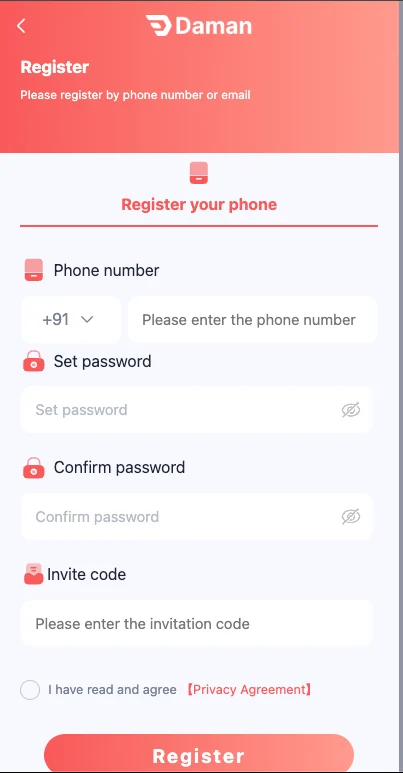
The supplied registration screen separates the mobile number, password, confirmation, invitation code and agreement. Fill the number first, create the password, confirm it exactly and request the verification code only after checking the number.
Read the visible agreement before submitting. A successful registration should lead to one account whose mobile number and credentials you control.
02
Most new-account errors come from a wrong prefix, mistyped number, mismatched passwords or an expired verification code. Correct the exact field indicated by the screen instead of restarting every step.
If a number is already registered, use Daman Game Login or recovery. Creating another account can disconnect the user from previous transaction history.
Return to login or recovery.
Enter the same new password in both fields.
Request one fresh code after waiting.
Read the visible text before accepting.
03
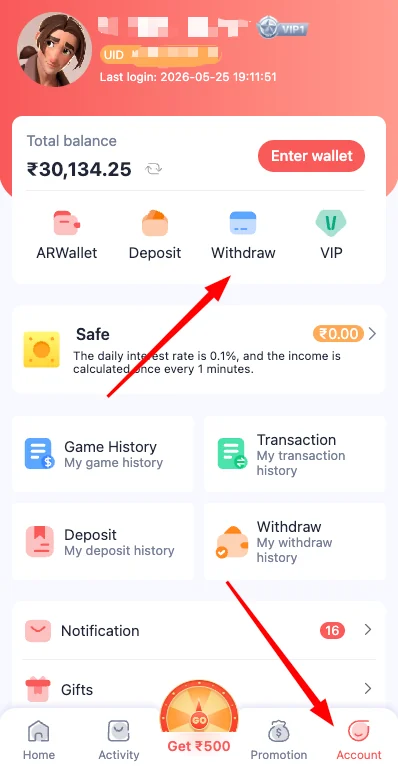
After registration, confirm the account identifier, registered number and security controls. Do not add payment details until the account information is correct.
Use a small, controlled first action only after the login and wallet sections are understood. Keep the first transaction reference until it settles.
04
Registration is not a password-recovery method. It is also not a solution for a pending deposit, withdrawal or app-loading issue.
Use the account section that matches the problem so records remain connected to the correct mobile number.
Use recovery from the login screen.
Open transaction history and keep the reference.
Review the request and linked account.
Fix the installation or session first.
05
The mobile number used for Daman Game Register should remain under your control because it can be needed for verification and password recovery. A temporary or inaccessible number can create a serious problem after balance or transaction records exist.
Create a password that can be stored securely without being reused elsewhere. The purpose is not only to complete registration but to preserve reliable access months later.
06
The registration screen can include an invitation code. Enter it only when you have a known code and understand the visible conditions. A code does not automatically prove a fixed reward, withdrawal eligibility or future profit.
If the field is optional, review it before submitting. If the screen requires a value, use the current registration information rather than an old code copied from an unrelated website.
Use a code received through a source you recognize.
Read current terms before expecting any benefit.
Do not assume a code guarantees money or a specific bonus.
Treat the active registration form as the source of truth.
07
The verification code confirms access to the mobile number. Enter it only in the expected Daman Game Register screen and never read it aloud or send it in a message. A legitimate verification step does not require remote control of your device.
If the code expires, request one new code after confirming the number. Do not submit several codes at random because only the most recent may remain valid.
08
After the account opens, check the registered number, account identifier, security settings and available wallet controls. This is the best time to catch a mistyped number or unexpected profile detail before any payment is made.
Open Daman Game Login once with the new credentials to confirm that the password works. Then sign out and sign in manually on the same controlled device.
Confirm the registered mobile number.
Verify password controls and recovery options.
Do not add payment details until the profile is correct.
Test one manual sign-out and sign-in.
09
Daman Game Register is not the correct response to a missing deposit, pending withdrawal, failed app installation or forgotten password. Creating a second account can split transaction history and make support review more difficult.
Use login recovery, app troubleshooting or transaction history according to the actual problem. One account with complete records is easier to secure and understand.
10
Keep the registration details, account identifier and password in a private record. Update that record only when a confirmed password change is completed. Do not store an OTP because each code is temporary.
Set a personal time and money limit before opening a game. Registration creates access; it does not remove financial risk or guarantee a result.
Store the mobile number and account identifier.
Change it only from a trusted device.
Verification codes are temporary.
Decide time and spending limits before play.
11
Registration is not complete in a practical sense unless the mobile number remains usable. The same number can be needed for login verification, password recovery and account-security checks later.
Avoid numbers that you do not control or may lose soon. If the number changes after registration, review the account settings before a payment or withdrawal request.
12
A successful Daman Game Register action should create one account with a visible identifier, registered mobile number and working password. It should not require repeated registration attempts or several different accounts.
After the confirmation screen, sign out and test Daman Game Login once. This verifies that the new credentials work and helps identify a mistyped password before any wallet activity begins.
13
Registration fields can include agreements, risk text and invitation conditions. Read them before accepting, especially where age, eligibility or financial activity is involved.
Account creation does not guarantee a reward, profit or successful withdrawal. Keep expectations separate from promotional language and use personal limits from the beginning.
14
The first few account sessions are the best time to confirm that registration details remain correct. Use Daman Game Login from the same controlled device, review the profile and security controls, and make sure the mobile number can still receive verification messages. Do not add several payment methods or make repeated changes while the account is new.
Keep the account simple until the basic access routine is stable. One registered number, one current password, one verified payment destination and one clear transaction record make future recovery much easier. If a profile detail is wrong, correct it before using the wallet or entering a game.
Questions
Use the answer that matches the current account state and keep a clear record of any change.
A mobile number, password, confirmation and verification code are commonly shown. An invitation field can also appear.
One verified account is easier to recover and audit. Multiple accounts can separate credentials and wallet records.
Check the number prefix, network signal and message filtering. Wait before requesting another code.
Use a unique password with a mix of characters and do not reuse an email or social-account password.
Use the current registration screen as the source of truth. The field and its requirements can change.
Keep the registered mobile number, account identifier and a private password record. Never save an OTP for reuse.
Use the current registration screen, enter a mobile number you control, create and confirm a private password, complete the visible verification step and review the fields before submitting.
Keep the registered mobile number and account identifier, then use the same account for login, app access and later wallet records instead of creating another account.