Wallet actions

Daman Game Deposit & Withdrawal

Daman Game deposits and withdrawals affect different sides of the wallet. Keep a separate record for each action and verify the amount, method and account before submission.

ACTIONConfirm → Complete → RecordMatch each wallet action with its amount, reference and final status.

01

Complete a Daman Game deposit with a record

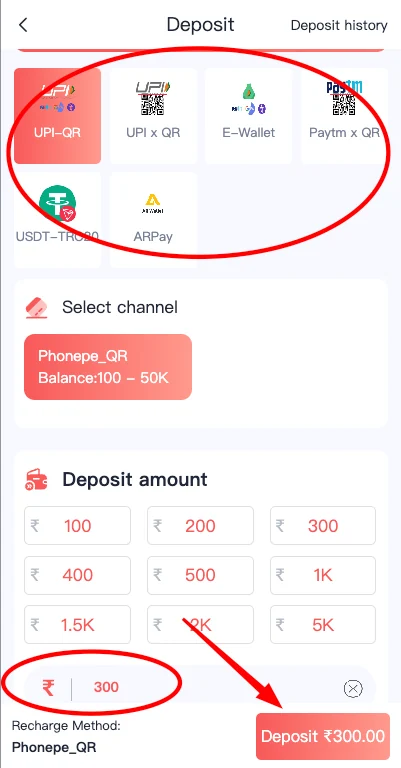
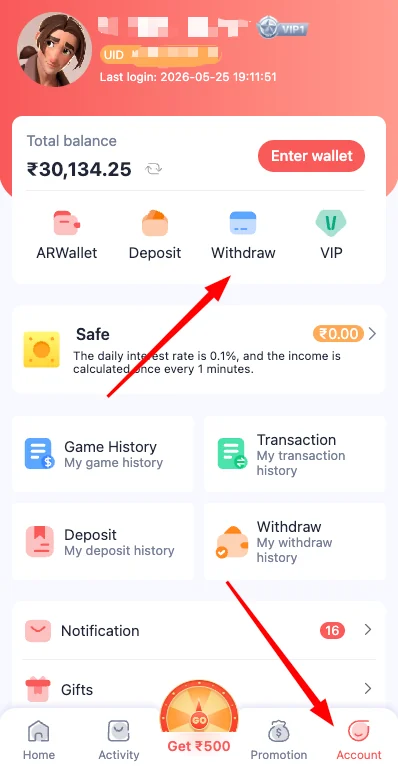
Open the wallet and choose Deposit. Select the visible payment channel, enter the intended amount and review the recipient or payment instruction before continuing.

After payment, keep the reference and check transaction history. A delayed balance should be traced before another payment is attempted.

  • Confirm the selected payment method.
  • Check the amount twice.
  • Keep the payment reference.
  • Capture the pending or successful status.
  • Do not repeat a delayed payment immediately.

02

Submit a withdrawal to the correct account

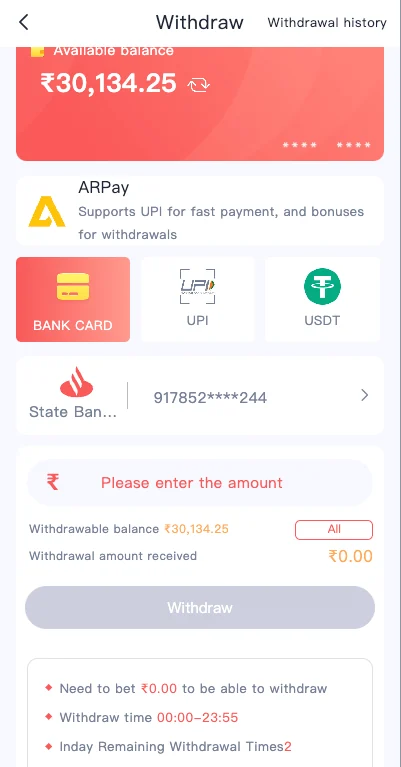
The withdrawal screen can show available balance, linked payment details and an amount field. Confirm the account holder and destination before submitting.

If the screen displays a turnover or other account condition, review it before requesting the withdrawal. Keep the request time and status.

Linked account

Verify the name and number.

Withdrawal amount

Check limits and decimal placement.

Login password

Enter it privately on the expected screen.

Pending status

Keep the time and request reference.

03

Use transaction history as the first evidence source

Transaction history can separate deposits, withdrawals, promotions and other balance changes. Match the exact wallet action instead of relying only on the total balance.

When asking for a review, include the relevant record and exclude unrelated private credentials.

  • Open the correct transaction category.
  • Match date, time and amount.
  • Keep the reference and status.
  • Capture only the relevant record.
  • Never include a password or OTP.

04

Stop when payment details change unexpectedly

A different recipient, unfamiliar QR code or changed bank detail should be checked before payment. Do not continue simply because a timer or message creates urgency.

Use the current in-account method and preserve evidence if the details do not match the expected workflow.

Unknown recipient

Stop and confirm the current method.

Changed QR code

Check inside the account before scanning.

Repeated payment request

Trace the first transaction.

Remote-support request

Do not share device control or private codes.

05

Confirm the Daman Game Deposit recipient before payment

The visible deposit method should show the channel, amount and recipient or QR details. Compare these details immediately before payment because a saved screenshot or old message can become outdated.

When the recipient or instruction looks unfamiliar, stop and reopen the current account deposit area. Do not rely on urgency or a request sent outside the account.

  • Open the deposit area directly from the account.
  • Confirm the amount and payment channel.
  • Check the recipient or QR details.
  • Keep the payment reference after completion.

06

Track a deposit from payment to wallet credit

A Daman Game Deposit has at least two records: the payment record from the chosen method and the wallet transaction inside the account. Keep both until the balance is credited.

If the payment is successful but the wallet is pending, note the exact time and reference. Do not make a second payment simply to test whether the first one worked.

Payment record

Shows the amount, time and external reference.

Wallet record

Shows pending, successful or failed status.

Balance check

Confirms when funds become available.

Support request

Combines both records without private credentials.

07

Prepare linked details before a Daman Game Withdrawal

Before a Daman Game Withdrawal, review the linked bank or payment account and confirm that the account holder details are correct. A typo can cause rejection or delay.

Check the available balance, amount limits and any visible account condition. Enter the login password only on the expected withdrawal screen and do not share it in a support message.

  • Verify the account holder name.
  • Check account number and payment method.
  • Review available balance and limits.
  • Keep the withdrawal request status.

08

Understand pending, failed and successful statuses

A pending status means the request is still being processed; it does not automatically mean failure. A failed or rejected status should be read together with the visible reason, account details and amount.

A successful status should be matched with the receiving account. Keep the transaction record until the funds are confirmed.

Pending

Wait and preserve the request time.

Failed

Read the visible reason before retrying.

Rejected

Review linked details and conditions.

Successful

Confirm receipt in the linked account.

09

Use safe information when asking for wallet help

A useful request includes the account identifier, action type, amount, method, time, reference and visible status. It does not include the password, OTP, payment PIN or unnecessary identity documents.

Redact unrelated transactions from screenshots. A focused record is easier to understand and safer to share.

  • Include the exact action and amount.
  • Include reference, time and visible status.
  • Redact unrelated account information.
  • Never include password, OTP or PIN.

10

Keep wallet actions within a personal limit

A deposit should fit a pre-set entertainment budget and should never use borrowed or essential money. A withdrawal delay should not be answered with another deposit or a larger game entry.

Keep financial decisions separate from pressure, urgency and attempts to recover losses. Stop account activity when the personal limit is reached.

Set the budget first

Choose an amount before opening the wallet.

Do not borrow

Use only disposable funds.

Do not chase

A loss does not justify a larger deposit.

Pause during disputes

Resolve the wallet record before continuing.

11

Reconcile the Daman Game wallet after each action

After a Daman Game Deposit, compare the external payment record with the account transaction and final balance. After a Daman Game Withdrawal, compare the request record with the receiving account.

This reconciliation should happen before another payment or withdrawal. It catches duplicate, missing or incorrectly matched transactions while the details are still available.

  • Match amount and time.
  • Match payment or withdrawal reference.
  • Confirm final wallet balance.
  • Keep records until the action settles.

12

Avoid mixing promotional credit with deposited funds

A wallet can show deposited funds, promotional credit, referral amounts and game settlements together. Review transaction categories so a promotional amount is not mistaken for withdrawable deposited funds.

Read any visible conditions connected to a bonus or gift. Do not assume that every displayed balance follows the same withdrawal rules.

  • Identify the transaction category.
  • Read visible promotional conditions.
  • Separate deposited funds from bonus credit.
  • Check withdrawable balance before requesting.

13

Create a clear timeline for a delayed transaction

For a delayed wallet action, write a simple timeline: request time, payment completion, account status, any status change and current balance. Attach the matching reference and one clear screenshot.

A timeline helps distinguish processing delay from rejection or mismatch. It also prevents repeated actions while the first one is still unresolved.

  • Request or payment time
  • Reference and method
  • Visible account status
  • Current balance and receiving-account status

14

Use a wallet closeout check at the end of the day

At the end of account activity, compare the opening balance, deposits, withdrawals, game settlements, promotional credits and closing balance. This simple review helps identify a missing entry or duplicate payment while the references are still easy to find.

Keep unresolved actions in a separate note with their status and reference. Do not include them as available funds until they settle. A daily closeout also supports personal spending limits by showing the total amount moved through the account rather than only the current balance.

  • Record opening and closing balance.
  • List deposits and withdrawals separately.
  • Match game settlements and promotional credits.
  • Carry pending actions forward with references.
  • Compare total activity with the personal budget.

15

Keep account and payment identities consistent

A wallet action is easier to verify when the registered account, linked payment name and receiving details remain consistent. Review the spelling, number and payment type before submission. When a platform requests account verification, use only the current in-account process and avoid sending identity records to unrelated contacts.

If a linked account needs correction, make the change before submitting another withdrawal. Preserve the old request status and the new confirmed details separately so the history remains clear.

  • Match the registered account and payment holder where required.
  • Review every digit before saving a bank or payment account.
  • Do not edit linked details during a pending request unless instructed in-account.
  • Keep a record of confirmed changes and request statuses.

Questions

Daman Game Deposit & Withdrawal answers

Use the answer that matches the current account state and keep a clear record of any change.

What should I save after a Daman Game deposit?

Keep the amount, time, method, transaction reference and a screenshot of the wallet status until credited.

What should I check before a withdrawal?

Confirm the linked account details, amount, password request and visible account conditions.

Why can a deposit remain pending?

Payment processing, reference mismatch or delayed account update can cause a pending status.

Should I pay again when the first deposit is delayed?

No. Trace the first payment before repeating it.

Why can a withdrawal be rejected?

Incorrect payment details, unmet visible conditions, amount limits or account verification can cause rejection.

What details help support review a wallet issue?

Provide the account identifier, amount, time, method, reference and visible transaction status without sharing the password or OTP.