
Daman password rejected
Remove an old saved password, check caps lock and re-enter the current password once. Move to recovery if verified details still fail.
See login answers →Existing-account access
Daman Game Login is for returning users who already have an account. The steps below cover credential checks, recovery, new-device access and post-login account review.
Direct account answer
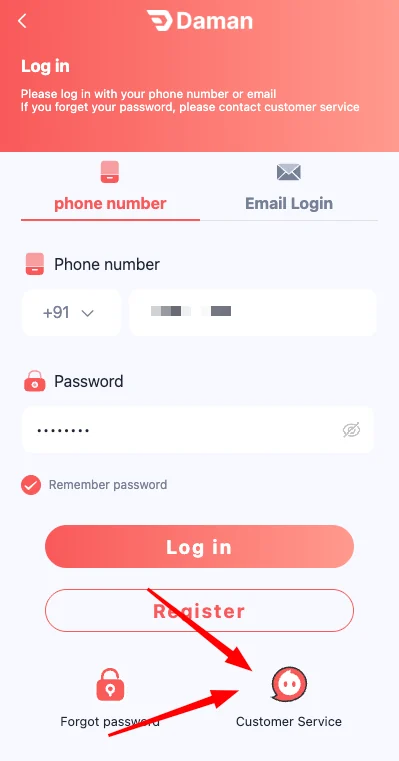
Use the mobile number already registered to the account and the current password on the expected Daman Game Login screen. Check the number prefix and destination before submitting; if the password is rejected after those checks, use the visible recovery route instead of creating another account.
Remove an old saved password, check caps lock and re-enter the current password once. Move to recovery if verified details still fail.
See login answers →Check signal, number prefix and message filtering, then wait before requesting another code so several active codes do not create confusion.
Open problem checks →After installing one verified current app package, use the same registered account credentials and review the account details after access.
Check app access →Interface check
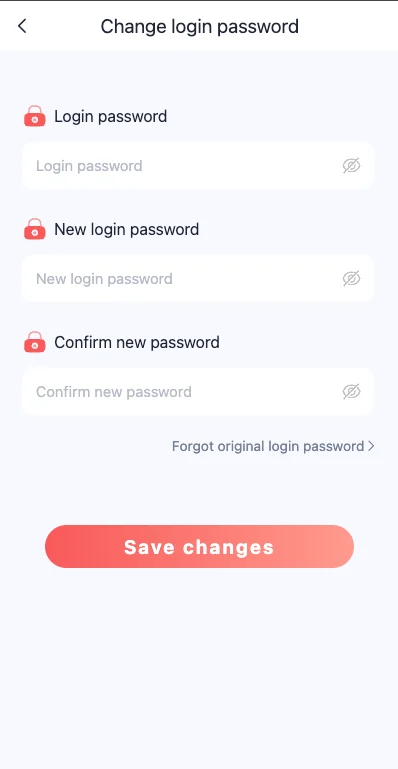
These supplied interface screenshots are placed beside the page that explains the same account action, so the instructions and visible controls stay connected.
01
Open the expected destination and confirm the visible brand before entering any detail. Use the mobile number connected to the account, check the country prefix, enter the current password and review both fields before pressing Login.
After access, check the account name or identifier, balance and linked payment details. An unfamiliar change should be understood before opening a game or wallet action.
02
A rejected login does not always mean the account has changed. A wrong number prefix, hidden space, old saved password or caps-lock error can produce the same message.
Correct one item at a time. If the same verified details still fail, use the visible recovery route and keep a note of the time and device.
Compare the number with the original registration record.
Remove saved credentials and enter the current value manually.
Check signal and message filtering before requesting another code.
Complete the visible verification without sharing the code.
03
A duplicate registration can separate wallet history from the original account. Use Forgot Password or the available recovery control first.
Create a strong replacement password, confirm it twice, and review the account menu after access. Check the registered mobile number, linked payment details and transaction history for unexpected changes.
04
A successful login is not the end of account security. Avoid storing credentials on a shared device, do not approve remote-control access and sign out when finished.
If a session behaves unexpectedly, close it, change the password and review recent account and wallet activity before continuing.
Do not save credentials; sign out fully.
Change the password and check activity.
Decline it and keep control of the device.
Verify the current in-account method before paying.
05
The mobile number is the account anchor shown on the Daman Game Login screen. Compare it with the number used at registration, including the country prefix. A single missing digit or an automatically inserted space can make a correct password appear invalid.
When the number is correct but the password is not, move to recovery. Do not change both the mobile number and password in the same troubleshooting attempt, because that makes it harder to identify which detail caused the failure.
06
A password reset should begin from the recovery control connected to the current Daman Game Login screen. Enter the registered number, create a unique replacement and confirm the same value twice. Request one verification code and wait for it before asking for another.
After the reset, sign in manually instead of relying on an old saved password. Review account information, linked payment details and recent wallet activity. If anything is unfamiliar, stop before opening a game or starting a payment.
Use a value not shared with email, social media or another platform.
Multiple rapid requests can create confusion about which code is current.
Typing the new value confirms that old saved credentials are removed.
Check profile, payment and transaction areas after recovery.
07
An account session should be closed when the device is shared, the visible account does not match the expected user, or payment details have changed unexpectedly. Continuing inside an unfamiliar session can mix records or expose private information.
Use the sign-out control, close the app and clear saved credentials when needed. If the session was not created by you, change the password from a trusted device and review recent activity before continuing.
08
Sometimes Daman Game Login is correct but the service is temporarily slow. A loading screen, timeout or delayed verification code can affect many users without changing the account itself. Wait, test one stable connection and avoid repeated password resets during a temporary interruption.
If the account opens through one access method but not another, the issue is likely connected to the app session, cache or version. Keep the same credentials and fix the access method instead of registering again.
Wait and retest before changing account details.
Clear app cache or update one current version.
Review storage, time settings and saved session data.
Check signal and message filtering, then wait.
09
A useful access record includes the time, device type, visible error message and the account identifier when safe to show. It does not include the password, OTP or full payment details. Redact private information before saving or sharing a screenshot.
When contacting the support control visible inside the account, describe the exact step that failed. “Login failed after entering the registered number” is more useful than a general message that the account is not working.
10
After Daman Game Login works again, keep one current password and one primary device until the account is stable. Repeated device changes, several saved versions and multiple login attempts can make future troubleshooting harder.
Update your private password record, remove outdated saved credentials and keep the registered mobile number available. A consistent routine improves account recovery and keeps wallet records attached to the expected account.
Delete outdated saved values.
Avoid switching among duplicate packages.
Use a controlled device for security changes.
Do not create a second account for the same issue.
11
A second login attempt is reasonable only after the mobile number and password have been checked carefully. Recovery is appropriate when the password is genuinely unknown or changed. Waiting is appropriate when every screen is slow or unavailable and there is no sign that the account itself changed.
Choosing the correct response prevents unnecessary password resets and duplicate accounts. Record the visible message and the last successful access time before taking the next step.
12
A new-device login can create an additional verification step or expose saved information differently. After Daman Game Login succeeds, check the registered number, account identifier, linked payment details and recent transactions before opening a game.
If the device is temporary or shared, avoid saving the password and sign out completely. Remove downloaded screenshots or records that contain private account information.
13
A stable account routine uses one registered mobile number, one current password, one secure recovery method and a small number of controlled devices. Constant changes make it harder to recognize suspicious activity and can complicate recovery.
Update your private credential record after every confirmed password change. Do not store OTPs, because they are temporary and should never be reused.
Questions
Use the answer that matches the current account state and keep a clear record of any change.
The registered mobile number and current password are the main details shown on the login screen. A verification step may appear when access changes.
Check typing, caps lock and the registered number. Use password recovery rather than creating another account or making repeated guesses.
A temporary service issue, weak connection, old app session or corrupted cache can cause loading. Restart, clear cache and test one current access method.
Use the registered credentials only on a device you control. Review account details after a new-device login and sign out from shared devices.
No. A password, OTP or recovery code should remain private.
Check the full destination, visible Daman branding and expected login fields before entering credentials.
Use the registered mobile number and current password on the expected login screen. Check the number prefix and destination, then use the visible recovery route if verified details still fail.
Use the visible password-recovery control from a device you trust. Complete the current verification step privately, create a new unique password and review account details after access is restored.